Fast, free & private text snippets manager
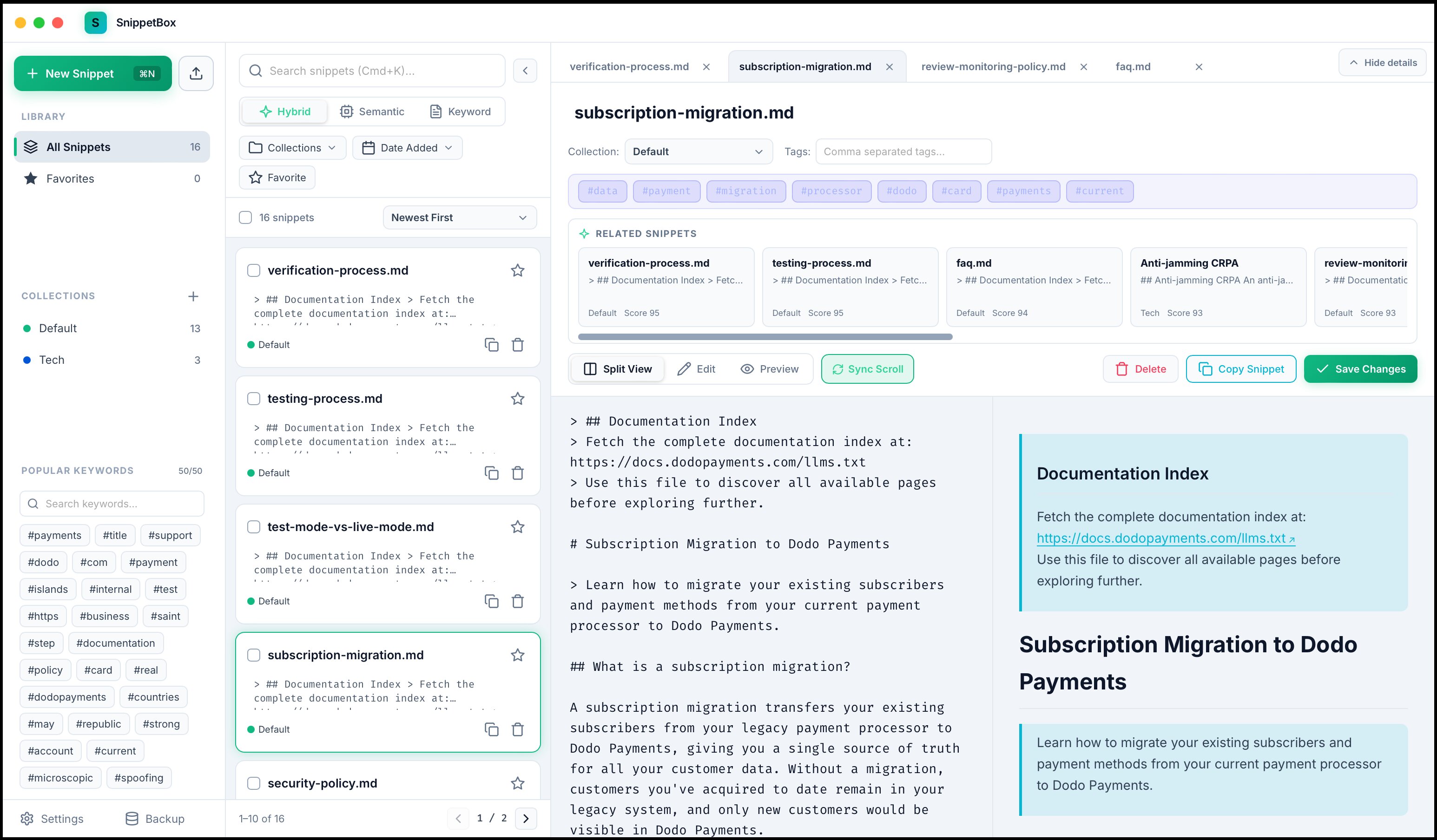
Full split-view editing, all text files supported, collections, favorites and tags for organization, multi-tab interface, related snippets, and a powerful hybrid semantic + keyword search with an in-built embeddings model, and a few other useful features. And yes, open-source.
Features
A serious home for every snippet you've ever saved.
Everything you'd expect from a snippet manager — plus on-device semantic search and a workspace that scales from ten snippets to ten thousand.
Write & read
📝Full Markdown editor
A split-view editor with live rendered preview, comfortable monospace typing, tab indentation and handy format shortcuts.
🎨Syntax-highlighted code
Highlight.js highlighting across dozens of languages, with a one-click “Copy code” button on every block.
🔗Clickable external links
Markdown links open safely in your default browser through the Tauri opener plugin — no surprises.
Find anything
⚡Hybrid search
Fuses vector cosine similarity with SQLite FTS5 keyword ranking (BM25) using Reciprocal Rank Fusion. Toggle between Hybrid, Semantic and Keyword modes.
🧠Local ONNX embeddings
Bundles jina-embeddings-v2-small-en — 512 dimensions, up to 8192 tokens — running offline through ONNX Runtime and Hugging Face tokenizers.
🌐Bring your own provider
Switch to any OpenAI-compatible endpoint — OpenAI, Ollama, LM Studio, vLLM or LocalAI — with an interactive connection tester.
🏷️Automatic keywords
Representative NLP keywords are extracted on every add or update, feeding an interactive keyword cloud for instant filtering.
🔎Related snippets
Explore up to ten hybrid-ranked related snippets right below the active snippet's keywords.
📋One-click quick copy
Instant clipboard copying with copy-count tracking and unobtrusive toast feedback.
Organize & scale
📁Collections
Organize snippets into custom collections with personalized colors, rename them from a dedicated dialog, and filter by many collections at once.
🧭Tabbed snippet viewer
Keep several snippets open in a scrollable tab strip. Choose new-tab or current-tab opening, collapse details for a full-height workspace, and tuck the browser into a compact rail.
🎚️Scoped filtering
Multi-select collections, tags, languages and date ranges to narrow your library to exactly the right slice.
☑️Bulk selection
Select many snippets with checkboxes, Shift-click or Cmd/Ctrl-click, then move, tag, favorite, export JSON or delete them together.
📥Background import
Queue files or recursively scan whole folders into a collection while you keep working. Progress is unobtrusive, interrupted jobs resume on startup, binary files are skipped safely.
🖥️Tailored window
Frameless, modern window chrome with custom title-bar dragging, macOS traffic lights and sleek controls on Windows and Linux.
Search engine
Semantic when you mean it, keyword when you need it.
Keyword search matches any query term with stemming and prefix matching across titles, content, tags and extracted keywords. Semantic search uses cosine similarity over your local embeddings. Hybrid blends both ranks with reciprocal rank fusion — and falls back to keyword search if a provider is ever unavailable.
Download
Coming soon.
SnippetBox is still in development and launching before 20th September 2026. Downloads will appear here on launch day - no account, no telemetry wall, no upsell. The code will be open-sourced within a week of launch.
FAQ
Fair questions.
Does SnippetBox send my snippets anywhere?
No. Your library lives in a local SQLite database and search runs on your machine. The default embedding provider is a bundled ONNX model, so even semantic search works with the network unplugged.
What does “hybrid search” actually mean?
It runs keyword search (FTS5 with BM25 ranking and stemming) and semantic search (cosine similarity over embeddings) at the same time, then combines their rankings with Reciprocal Rank Fusion. You can also pin it to Semantic or Keyword only. Displayed scores are relative ranking scores, not match probabilities.
Can I use OpenAI or a local model instead of the bundled one?
Yes. Settings lets you point SnippetBox at any OpenAI-compatible endpoint — OpenAI text-embedding-3-small, Ollama, LM Studio, vLLM or LocalAI — with a connection tester that measures latency and confirms the vector dimension.
How do I import my existing notes?
Queue one or many text, Markdown, MDX or source-code files — or recursively scan entire folders — into a chosen collection. Imports run in the background while you keep working, and interrupted jobs resume on the next startup. Binary files are ignored safely.
How many snippets can it handle?
Exact vector scoring scans stored embeddings, which favors correctness for personal snippet libraries over approximate indexing for very large datasets. Keyword search stays fast on large libraries, and hybrid search keeps results relevant without any tuning.
Is SnippetBox free?
Yes. It's an indie project — download it, build it from source, and keep every snippet you own.